Author: Moheb

  • WooCommerce vs. Shopify: Choosing the Right Platform for Your E-commerce Business

    WooCommerce vs. Shopify: Choosing the Right Platform for Your E-commerce Business

    In the vast and ever-evolving world of e-commerce, choosing the right platform for your online store is a critical decision. Two of the most popular and powerful contenders in this space are WooCommerce and Shopify. Both offer robust features to help you build and manage an online business, but they cater to different needs and technical proficiencies.

    This article will break down the key differences between WooCommerce and Shopify, helping you determine which platform is the best fit for your e-commerce aspirations.

    The Contenders: A Quick Overview

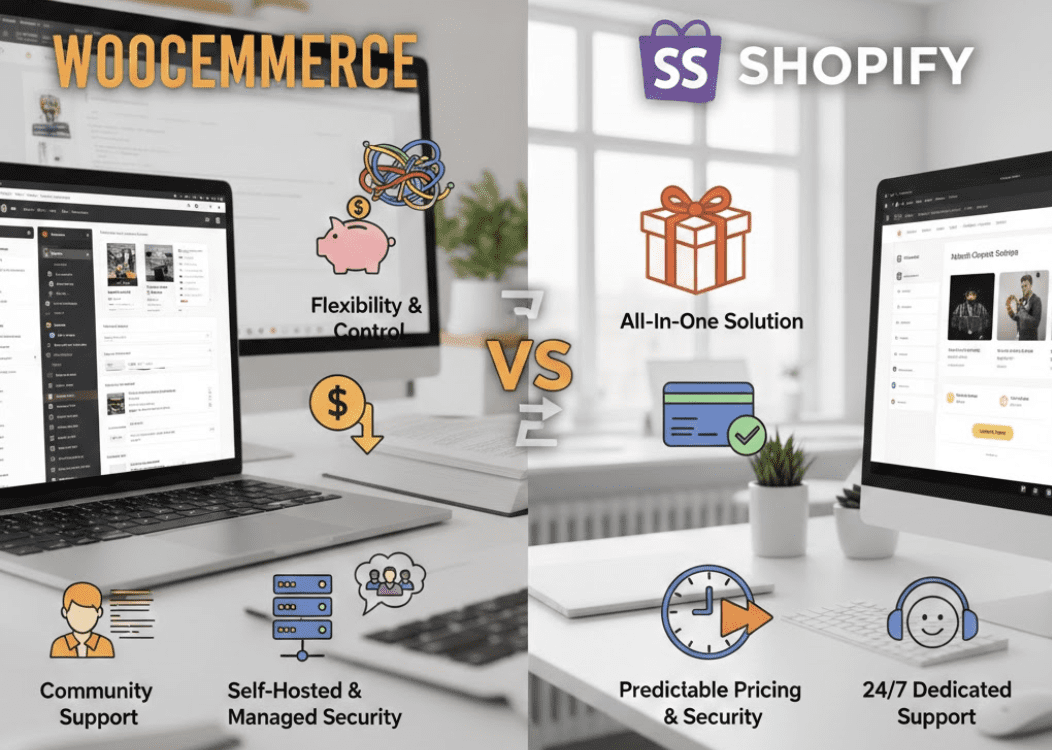
    Shopify: Shopify is a hosted e-commerce platform, meaning it takes care of all the technical aspects of running an online store – hosting, security, updates, and more. It’s known for its user-friendliness, all-in-one solution, and excellent customer support.

    WooCommerce: WooCommerce is an open-source e-commerce plugin built for WordPress. This means it transforms any WordPress website into a fully functional online store. It offers immense flexibility and control, but requires a bit more technical involvement from the user.

    Key Comparison Points

    Let’s dive into the specifics:

    1. Ease of Use & Setup

    • Shopify: Shopify is designed for beginners and those who prefer a hassle-free experience. Setting up a store is incredibly intuitive, with a drag-and-drop interface, guided setup wizards, and a clear dashboard. You can get an online store up and running in a matter of hours, even without any technical background.
    • WooCommerce: While the WooCommerce plugin itself is easy to install, it requires an existing WordPress site. If you’re new to WordPress, there’s a learning curve involved with setting up hosting, installing WordPress, and then configuring WooCommerce. However, for those already familiar with WordPress, integrating WooCommerce is relatively straightforward.

    2. Cost

    • Shopify: Shopify operates on a subscription model with various plans (Basic Shopify, Shopify, Advanced Shopify). These plans include hosting, security, and access to their core features. You’ll also encounter transaction fees if you don’t use Shopify Payments, and costs for premium themes or apps.
    • WooCommerce: WooCommerce is technically free as a plugin. However, you’ll incur costs for web hosting, a domain name, and potentially a premium WordPress theme and various extensions or plugins for added functionality. While it can be cheaper in the long run for experienced users, initial setup costs can vary widely.

    3. Customization & Flexibility

    • Shopify: Shopify offers a good range of customization options through its theme store and app marketplace. You can modify the look and feel of your store and add functionalities with ease. However, there are limits to how deeply you can customize the underlying code without advanced developer knowledge.
    • WooCommerce: As an open-source platform, WooCommerce offers unparalleled flexibility. You have complete control over every aspect of your website and store. With access to the WordPress ecosystem of themes and plugins, the possibilities for customization are virtually endless. This freedom comes with the responsibility of managing and maintaining these customizations.

    4. Scalability

    • Shopify: Shopify is built to scale. From small startups to large enterprises, Shopify handles traffic and transactions effortlessly. Their infrastructure ensures your store remains fast and reliable, even during peak sales periods.
    • WooCommerce: WooCommerce can also scale effectively, but it largely depends on the quality of your web hosting and how well your WordPress site is optimized. For very large stores with high traffic, you might need to invest in more robust hosting solutions and potentially a dedicated server.

    5. Security

    • Shopify: Shopify handles all security aspects, including SSL certificates, PCI compliance, and regular updates. This “set it and forget it” approach provides peace of mind for merchants.
    • WooCommerce: With WooCommerce, you are responsible for your store’s security. This includes choosing a secure host, installing an SSL certificate, regularly updating WordPress and all plugins/themes, and implementing security best practices.

    6. Support

    • Shopify: Shopify is renowned for its 24/7 customer support via live chat, email, and phone. They offer extensive documentation and a vibrant community forum.
    • WooCommerce: WooCommerce support primarily comes from the vast WordPress community, documentation, forums, and the developers of individual themes and plugins. While there’s a wealth of information available, it’s not a centralized support system like Shopify’s.

    Who Should Choose Which Platform?

    Choose Shopify if:

    • You’re a beginner with no coding experience.
    • You want an all-in-one solution where all technical aspects are handled for you.
    • You prioritize ease of use and quick setup.
    • You’re comfortable with a monthly subscription fee.
    • You value dedicated 24/7 customer support.

    Choose WooCommerce if:

    • You already have a WordPress website or are comfortable with the WordPress ecosystem.
    • You want complete control and flexibility over your store’s design and functionality.
    • You prefer an open-source solution and are willing to manage your own hosting and security.
    • You’re looking for a potentially lower long-term cost if you can manage most aspects yourself.
    • You’re a developer or have access to one.

    Conclusion

    Both WooCommerce and Shopify are excellent platforms, each with its strengths. Shopify offers simplicity, speed, and comprehensive support, making it ideal for those who want to get online quickly with minimal technical fuss. WooCommerce provides unparalleled flexibility, control, and customization for those who are comfortable with WordPress and desire a more hands-on approach.

    Ultimately, the best platform for your e-commerce business will depend on your specific needs, technical expertise, budget, and long-term goals. Carefully consider these factors to make an informed decision that sets your online store up for success.
  • how to run a/b test with GA4 – Google analytics and tag manager

    how to run a/b test with GA4 – Google analytics and tag manager

    TL;DR / Quick Answer

    Can you run A/B tests with just GA4 and Google Tag Manager?

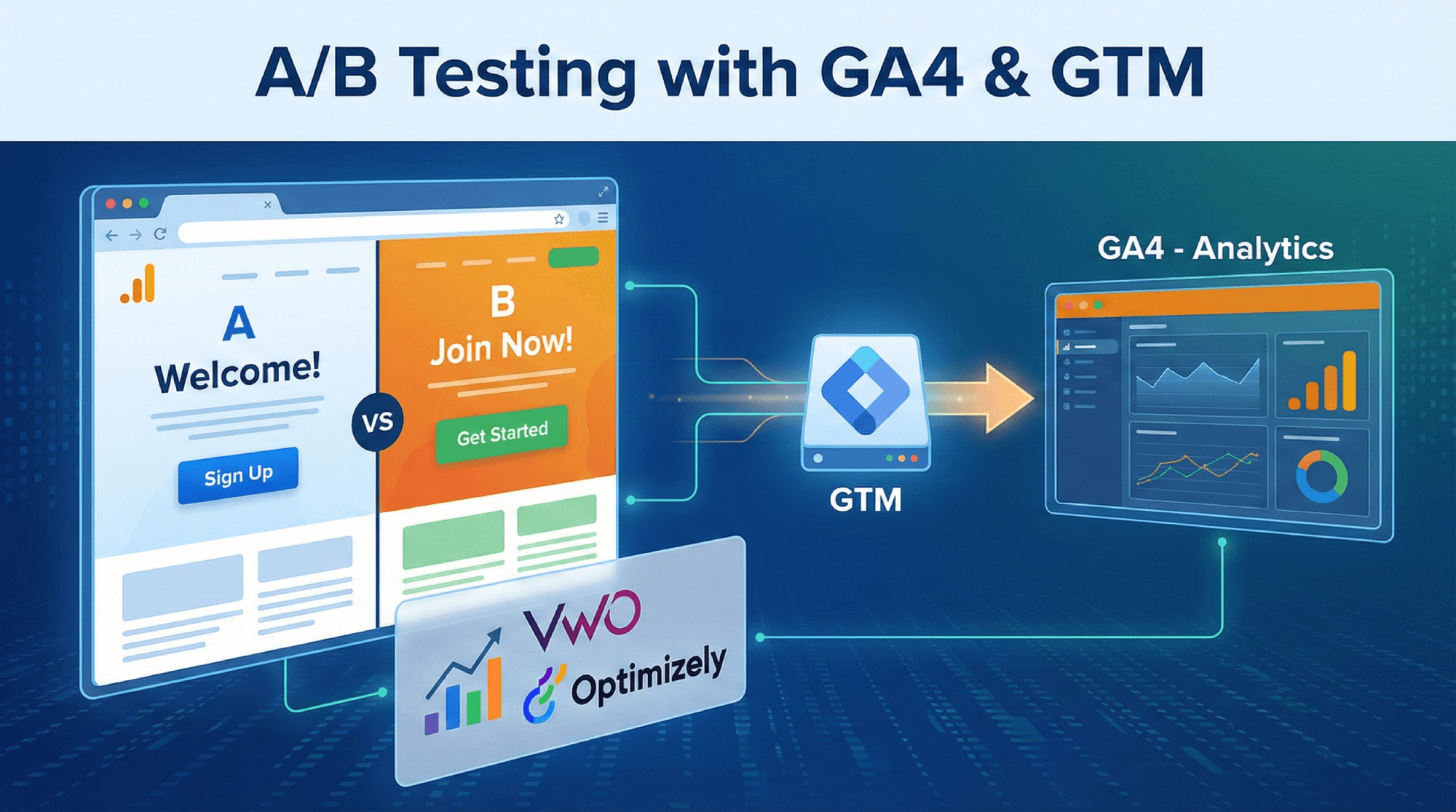
    Yes. You can run a basic A/B test by using Google Tag Manager (GTM) to inject JavaScript that alters page elements (the “Action”) and GA4 to measure the difference in performance (the “Measurement”). This method is free but technical. It requires creating a custom HTML tag in GTM to randomize user traffic and manipulating the DOM (Document Object Model) to show variants, then sending a custom event to GA4 for analysis.


    Part 1: The “DIY” A/B Testing Guide (GA4 + GTM)

    Since Google Optimize was sunset in 2023, marketers without a budget for enterprise tools (like Optimizely) must use this “hacky” but effective method.

    Phase 1: Set Up the “Switch” in Google Tag Manager

    You need a script that randomly assigns a visitor to “Control” or “Variant” and persists that choice so they don’t see different versions on reload.

    1. Open GTM and go to Tags > New > Custom HTML.
    2. Paste this Script (Basic JavaScript to split traffic 50/50):HTML<script> (function() { // 1. Check if user already has a variant cookie var variant = getCookie('ab_test_variant'); // 2. If not, assign one randomly (0 = Control, 1 = Variant) if (!variant) { variant = Math.random() < 0.5 ? 'Control' : 'Variant'; setCookie('ab_test_variant', variant, 30); // Save for 30 days } // 3. Push to Data Layer for GA4 to read window.dataLayer = window.dataLayer || []; window.dataLayer.push({ 'event': 'ab_test_active', 'test_name': 'Homepage_Hero_Test', 'variant_shown': variant }); // 4. APPLY CHANGES (The "A/B" part) if (variant === 'Variant') { // Example: Change H1 text var heroTitle = document.querySelector('h1.hero-title'); if (heroTitle) heroTitle.innerText = "New Optimized Headline!"; } // Helper: Cookie Functions function setCookie(name, value, days) { var d = new Date(); d.setTime(d.getTime() + (days*24*60*60*1000)); document.cookie = name + "=" + value + ";expires=" + d.toUTCString() + ";path=/"; } function getCookie(name) { var match = document.cookie.match(new RegExp('(^| )' + name + '=([^;]+)')); return match ? match[2] : null; } })(); </script>
    3. Triggering: Set the trigger to “Initialization” (or “Page View” at the earliest) on the specific page you are testing. Critical: Use “Initialization” to minimize “flash of original content” (FOOC).

    Phase 2: Configure GA4 to “Listen”

    Now that GTM is broadcasting the data, GA4 needs to catch it.

    1. Create Variables in GTM:
      • Go to Variables > User-Defined Variables > New > Data Layer Variable.
      • Name: dlv - test_name | Key: test_name
      • Name: dlv - variant_shown | Key: variant_shown
    2. Create a GA4 Event Tag in GTM:
      • Tag Type: GA4 Event.
      • Event Name: experiment_impression
      • Event Parameters:
        • test_name: {{dlv - test_name}}
        • variant_id: {{dlv - variant_shown}}
      • Trigger: Custom Event Trigger named ab_test_active (matches the event pushed in the script above).

    Phase 3: Analysis in GA4

    1. Wait for data (24-48 hours).
    2. Go to Explore > Free Form.
    3. Rows: test_name, variant_id.
    4. Values: Sessions, Conversions, Total Revenue.
    5. Compare the conversion rates of “Control” vs. “Variant”.

    Part 2: Comparison Table (GA4 vs. Top Platforms)

    For EEAT purposes, it is important to acknowledge that the DIY method above lacks statistical rigor compared to dedicated platforms. Below is a comparison of the “DIY” GA4 method against market leaders.

    FeatureGA4 + GTM (DIY)VWO (Visual Website Optimizer)Optimizely
    CostFree$$(Starts ~$200/mo)$$$$ (Enterprise only)
    Setup DifficultyHigh (Requires coding)Low (Visual Editor)Medium (Technical integration)
    Flicker ControlPoor (Risk of FOOC)Excellent (Smart Code)Excellent (Edge delivery)
    Stats EngineBasic (Raw data export)Bayesian (Easy to read)Sequential (Fast & rigorous)
    Target AudienceTechnical Marketers / DevelopersSMBs & Mid-MarketLarge Enterprises
    AI CapabilitiesNone (Manual Setup)AI Copy SuggestionsAI Personalization

    Expert Insight: Choose GA4+GTM if you have zero budget and know JavaScript. Choose VWO if you need a visual editor and reliable data without enterprise costs. Choose Optimizely if you are a Fortune 500 company needing server-side testing.

  • How to Dominate AI Search Visibility Science-Backed Guide for 2026

    How to Dominate AI Search Visibility Science-Backed Guide for 2026

    AI Overviews, AI Answers, and generative search are now the “homepage” of the internet.
    If your brand isn’t showing up inside these AI-generated shortlists, comparisons, and recommendation boxes, you’re losing visibility, even if you rank well on Google.

    A major 2025 research study (the one you shared) finally reveals how AI engines actually choose sources
    The findings are not intuitive, but they are extremely actionable.

    This guide breaks down the results into a simple, practical blueprint you can apply today.

    By the end, you’ll know [ Generative Engine Optimization: How to Dominate AI Search(Chen et al, 2025) ]:

    • exactly what AI engines reward
    • the 4 levers that move visibility the fastest
    • the content structures AI uses to build shortlists
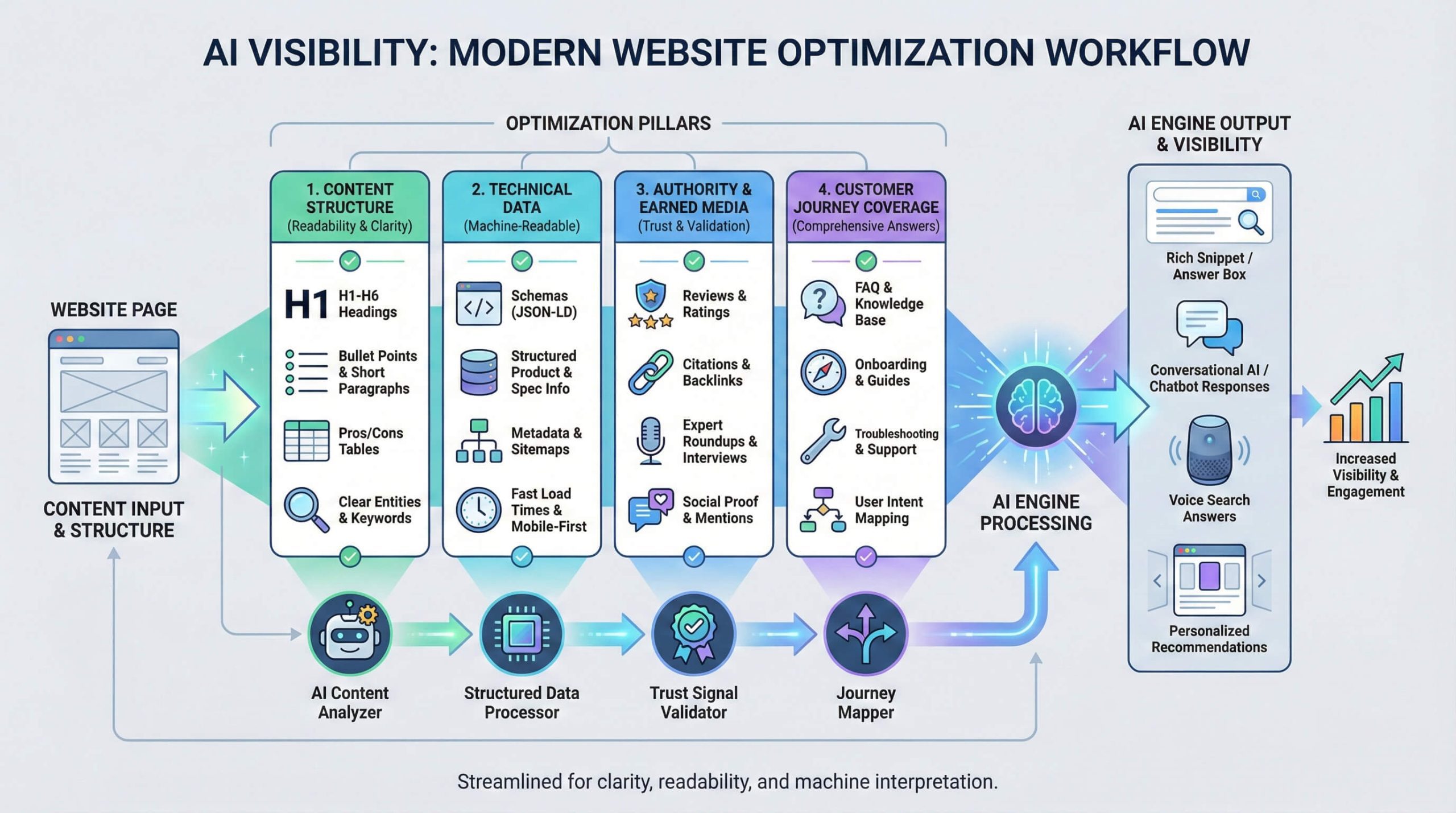
    • how to fix your site so AI can “parse, trust, and justify” your brand
    • and a full AI-Overview Optimization System (AIO System) to implement in order

    Let’s get into it.


    SECTION 1 — What AI Engines Actually Reward (According to the Research)

    The study analyzed thousands of AI responses across multiple engines (GPT, Claude, Gemini, Perplexity) and compared them to Google.

    The results are shocking.

    The biggest finding: AI engines overwhelmingly cite earned media, not brands.

    Across nearly all categories:

    • 70–90% of AI citations come from earned/third-party sites
      (review sites, comparison sites, blogs, forums, media)
    • Brand sites appear 10–30%
    • Social sites appear near 0%

    This is the opposite of Google, where brand + social are much stronger.

    What this means for you

    If your brand is not mentioned on independent review/comparison sites…

    ➡️ You will NOT appear in AI Overviews
    ➡️ No matter how perfect your on-site SEO is
    ➡️ No matter how good your content is

    Earned media is the #1 visibility lever in AI search.


    SECTION 2 — The 4 Levers That Move AI Visibility

    If you want visibility in AI Overviews, you only need to master four levers.

    These come directly from the study.


    Lever 1 — Machine-Scannable, Justification-Rich Content

    AI engines choose sources they can parse quickly and justify easily.

    This means designing your website like a machine-friendly answer sheet.

    Create pages AI can reuse instantly

    Include:

    ✔ “Best for X” labels
    ✔ Pros/cons lists
    ✔ Comparison tables
    ✔ “Who this is for / not for”
    ✔ Short paragraphs
    ✔ Structured answers
    ✔ Summary boxes
    ✔ Explicit justification language (e.g., “best for small rooms,” “most durable”)

    AI engines love structured reasons.
    Give them ready-made reasons to feature you.


    Lever 2 — API-Like Structure (Schema + Clean Facts)

    Your website must behave like an API:

    ✔ Complete schema.org markup
    ✔ Standardized spec blocks (same fields across pages)
    ✔ Clean text around pricing, specs, availability
    ✔ No key info hidden in PDFs, images, sliders, fancy UI
    ✔ FAQ blocks with structured questions and short answers

    AI engines cannot extract what they cannot see.

    The research clearly shows:
    Highly structured sites get more citations once they enter the “candidate list.”


    Lever 3 — Earned Authority (Your #1 Visibility Multiplier)

    AI search is biased in a way Google is not.

    It trusts independent reviewers more than brands.

    Earned authority comes from:

    ✔ high-authority comparison sites
    ✔ review blogs
    ✔ top lists from niche media
    ✔ expert roundups
    ✔ product reviewers
    ✔ local directories (for services)

    Without earned coverage → you are invisible to AI.

    With even a few strong earned mentions → you enter many shortlists overnight.


    Lever 4 — Multi-Language + Multi-Engine Alignment

    AI engines don’t share the same inputs.
    Many use different ecosystems in different languages.

    This means:

    • Create localized content if you serve multiple markets
    • Mirror real user phrasing (“best X for Y”, “top 10”, “cheap but reliable”)
    • Tune your content blocks for how engines parse prompts

    This increases your cross-engine visibility footprint.


    SECTION 3 — The AI-Overview Optimization System (AIO System)

    A step-by-step execution plan you can apply right now.

    This section gives you a clear, linear action plan—no fluff.


    STEP 1 — Build Your Machine-Readable Content Core

    Transform your top pages using these formats:

    1. Add “Best For X” Labels

    Examples:

    • “Best budget treadmill for apartments”
    • “Best dog toy for heavy chewers”
    • “Best ecommerce tool for small shops”

    2. Add Justification Blocks

    A 2–3 sentence “verdict box” at the top:

    Verdict:
    “[Product] is the best choice for [segment] because it offers [reason 1], [reason 2], and [reason 3].”

    3. Add Pros/Cons

    Simple, scannable bullets.

    4. Add Feature & Spec Tables

    Structured data → higher extraction accuracy.

    5. Add “Who This Is For / Not For”

    AI engines LOVE this.

    6. Add FAQ Blocks

    Questions must match search intent:
    ✔ “Is this good for…?”
    ✔ “Does it work with…?”
    ✔ “What’s the warranty…?”


    STEP 2 — Implement Full Schema + Structured Data

    At minimum:

    • Product
    • Review
    • Offer
    • FAQ
    • HowTo
    • Organization
    • LocalBusiness (if applicable)

    And then:

    Standardize all spec blocks across your site.

    AI engines reward consistency.


    STEP 3 — Build Earned Authority (Most Important Step)

    This is the one lever with the largest impact.

    Where you MUST get mentioned

    For product brands:
    ✔ niche review sites
    ✔ independent comparison blogs
    ✔ “best X for Y” articles
    ✔ expert roundups
    ✔ industry media

    For service businesses:
    ✔ local review directories
    ✔ niche directories
    ✔ trade portals
    ✔ comparison sites

    How to do it

    1. Identify 20–50 sites that appear in AI answers for your keywords.
    2. Pitch them with:
      • samples
      • data
      • comparison notes
    3. Ask for reviews that include:
      ✔ use-cases
      ✔ pros/cons
      ✔ who it’s for
    4. Link them from your press page.

    AI will see the association → and elevate you.


    STEP 4 — Cover the Full Customer Journey

    AI models construct answers using multi-stage reasoning.

    If you only have TOFU content → you lose.

    You must produce content for:

    • early research
    • comparisons
    • pricing + warranty
    • onboarding
    • how-to guides
    • troubleshooting
    • upgrading / renewal
    • accessories / alternatives

    This keeps your brand inside every AI conversation.


    STEP 5 — Local / Language Optimization

    If you sell in multiple markets:

    ✔ create localized pages
    ✔ fully translate content, not just homepages
    ✔ add hreflang
    ✔ local schema
    ✔ get local earned coverage

    AI engines often prefer local sources—even when users search in English.


    SECTION 4 — Quick Wins You Can Do in 48 Hours

    Here are 12 fast wins that immediately increase AI visibility:

    1. Add “verdict boxes” to 10 top pages
    2. Add pros/cons to all service/product pages
    3. Add “best for X” labels to key pages
    4. Standardize all spec tables
    5. Create 3 comparison pages (“us vs competitor”)
    6. Add FAQs with structured question formats
    7. Clean up pricing/availability text
    8. Add “who this is for/not for” on major pages
    9. Implement Product + FAQ schema
    10. Identify 10 earned media sites to pitch
    11. Mirror “best X for Y” phrasing in your titles
    12. Add a press/testimonials page linking to earned mentions

    These alone lift your “machine-scannability” score dramatically.


    SECTION 5 — The AI Visibility Scorecard (Free Framework)

    Use this to measure your likelihood of appearing in AI Overviews.

    AreaScoreNotes
    Earned coverage/40Your strongest lever
    On-page structure/25Verdicts, pros/cons, tables
    Schema & data/20Structured data hygiene
    Journey coverage/10Support, how-to, comparison
    Language/engine alignment/5Local + phrasing match

    100-point score.
    Anything under 50 = low AI visibility.
    70+ = good chance to appear in shortlists.
    85+ = strong consistent presence.


    SECTION 6 — Expected Results (Based on Research)

    Based on the study:

    • Adding justification-friendly structures → up to 40% visibility uplift
    • Increasing earned media → largest impact (70–90% of citations)
    • Cleaning schema + specs → improves extraction & shortlist inclusion
    • Local-language optimization → expands footprint across engines

    Realistically:

    If you have weak earned media now →
    You can go from 0 to consistent mentions in 30–90 days.

    If you already have earned coverage →
    Implementing GEO-style content upgrades creates noticeable AI-overview gains within weeks.


    SECTION 7 — The Bottom Line

    AI search is not Google search.

    AI Overviews reward:

    ✔ machine-scannable content
    ✔ structured data
    ✔ explicit justifications
    ✔ earned authority
    ✔ localized presence
    ✔ full journey coverage

    You don’t need tricks.
    You need clarity, structure, and citations from third parties.

    If you follow the AIO System above, you will:

    • rank in more AI-generated shortlists
    • appear in more comparisons
    • get named more often as a recommended option
    • build durable visibility across all AI engines

    This is the new marketing moat.

    Generative Engine Optimization: How to Dominate AI Search : Reference : https://arxiv.org/pdf/2509.08919

  • AI-Powered Marketing Automation: 10 Powerful Secrets to Growing Your Business 10X Faster

    AI-Powered Marketing Automation: 10 Powerful Secrets to Growing Your Business 10X Faster

    AI-Powered Marketing Automation is transforming how brands scale, compete, and convert customers online. In a digital world where speed, personalization, and efficiency determine who wins, AI has become the ultimate accelerator. Whether you’re running a startup or a growing enterprise, mastering AI automation is no longer optional—it’s the new competitive advantage.


    Why AI-Powered Marketing Automation Matters in 2025

    The business landscape has changed dramatically. Customer expectations are higher, attention spans are shorter, and competition is tougher than ever. Manual marketing processes simply can’t keep up.

    AI solves this by automating the repetitive, time-consuming tasks that drain your productivity—like email campaigns, lead scoring, content scheduling, and customer segmentation.

    The Rise of Predictive Analytics

    AI no longer just reacts; it predicts. It can:

    • Anticipate customer behavior
    • Forecast purchase intent
    • Identify at-risk customers
    • Recommend high-performing content

    Automation vs Manual Marketing in 2025

    Manual marketing:
    ❌ Slow
    ❌ Prone to errors
    ❌ Impossible to scale

    AI automation:
    ✔ 24/7 execution
    ✔ Consistent performance
    ✔ Hyper-personalization
    ✔ Real-time optimization


    Secret #1 – AI-Enhanced Email Marketing Automation

    Email is still the highest-ROI marketing channel—returning an average of $36 for every $1 spent. But with AI-powered marketing automation, email becomes even more powerful.

    Intelligent Segmentation & Targeting

    AI automatically groups subscribers based on:

    • Browsing behavior
    • Purchase history
    • Engagement level
    • Demographics
    • Lifecycle stage

    Predictive Sending & Dynamic Content

    AI determines the best time to send each email to maximize open rates and creates personalized content blocks that adapt to each reader.

    Top AI Email Tools

    • Klaviyo
    • HubSpot
    • ActiveCampaign

    These platforms use machine learning to improve every stage of your email marketing workflow.


    Secret #2 – AI-Powered Social Media Automation

    Posting manually on Instagram, TikTok, Facebook, or LinkedIn is a huge time drain. AI automates everything.

    Smart Captions, Hashtags & Post Ideas

    AI tools generate:

    • Captions
    • Reels ideas
    • Trending hashtags
    • Carousels
    • Brand-aligned visuals

    Auto-Replies & Engagement Optimization

    AI bots instantly respond to:

    • Comments
    • DMs
    • Mentions

    This boosts engagement and increases your reach almost instantly.


    Secret #3 – AI Lead Scoring & Sales Pipeline Automation

    Not all leads are equal. AI determines which leads are ready to buy—and which ones need nurturing.

    Predictive Lead Qualification

    AI ranks leads based on:

    • Behavioral signals
    • Conversion probability
    • Purchase readiness

    Churn Prediction & Sales Insights

    Before a customer leaves, AI flags the risk and suggests re-engagement strategies.


    Secret #4 – AI Website Personalization

    Your website should not show the same content to everyone. AI solves this by customizing the user experience in real time.

    Dynamic Content & Recommendations

    AI can:

    • Show different product recommendations
    • Use geo-targeted content
    • Change CTAs based on behavior

    Personalized Landing Pages

    Customized landing pages boost conversions by 15–30%, according to industry data.


    How to Get Started With AI-Powered Marketing Automation

    Step 1: Audit Your Current Marketing

    Identify bottlenecks: email, lead generation, content, support, or analytics.

    Step 2: Choose the Right Tools

    Start with the tools that solve your biggest problem first.

    Step 3: Integrate Your Tech Stack

    Your CRM, email software, and website must communicate seamlessly.

    Step 4: Implement Gradually

    Don’t automate everything at once. Start small, measure, then scale.

    Step 5: Continuously Optimize

    AI gets smarter with data. Feed it quality information and refine your workflows.


    Common Mistakes to Avoid

    ❌ Automating before mapping your customer journey
    ❌ Using too many tools without integration
    ❌ Over-personalizing without consent
    ❌ Assuming automation replaces human strategy


    FAQs About AI-Powered Marketing Automation

    1. Does AI replace human marketers?

    No—AI enhances human decision-making by handling repetitive tasks.

    2. How much does AI marketing automation cost?

    Tools range from free to premium enterprise solutions depending on features.

    3. What’s the biggest benefit of AI automation?

    Scalability. You can do 10X more in the same amount of time.

    4. Is AI automation difficult to learn?

    Most modern tools are user-friendly with intuitive interfaces.

    5. Can AI improve customer experience?

    Absolutely—hyper-personalization increases satisfaction and conversions.

    6. What AI tools should I start with?

    Email automation (Klaviyo or HubSpot) and social content tools (Jasper or Buffer).


    Conclusion – Why AI Marketing Automation Is Essential in 2025

    AI-Powered Marketing Automation isn’t just a trend—it’s the new foundation of business growth. If you want to scale faster, work smarter, and stay ahead of competitors, AI is the leverage you need.

    Start today. Your competitors already have.

  • Pop-up With Button vs Without Button: How a Simple Change Increased CTR by 2X

    Pop-up With Button vs Without Button: How a Simple Change Increased CTR by 2X

    Discover how a simple design tweak — adding a button to your pop-up — doubled CTR. Learn the psychology, design strategies, and A/B testing secrets behind this 2X boost.


    Introduction: The Power of a Single Element in Conversion Optimization

    In the fast-paced world of digital marketing, even the smallest tweak can yield astonishing results. One such tweak — adding a button to a pop-up — led to a 2X increase in click-through rate (CTR). This case study reveals how something as simple as a button transformed passive viewers into active participants.

    Marketers often overlook micro-design decisions, focusing instead on flashy campaigns. But as this experiment shows, conversion magic often hides in plain sight.


    Understanding CTR and Its Role in Digital Marketing Success

    What Is Click-Through Rate (CTR)?

    CTR measures how often people click on a specific element — like a pop-up, ad, or email link — compared to how many see it. For example, if 1,000 users see your pop-up and 100 click the button, your CTR is 10%.

    Why CTR Matters for Online Businesses

    A high CTR signals strong engagement and relevance. It’s not just about getting clicks; it’s about drawing users deeper into your conversion funnel. Whether you’re collecting leads or promoting products, CTR directly influences ROI and sales growth.


    The Psychology Behind User Interaction with Pop-Ups

    How Visual Cues Influence Click Behavior

    Humans are naturally drawn to visual prompts that suggest action. Buttons provide a clear, immediate path forward, guiding users subconsciously to take the next step. Without one, even interested users may hesitate or abandon the interaction.

    The Role of Micro-Commitments in Engagement

    A button represents a low-risk micro-commitment — a small “yes” that leads to a bigger conversion. This step is essential for building user confidence and momentum.


    Pop-ups Without Buttons: The Passive Experience

    Common Mistakes in Button-Less Pop-Up Designs

    Pop-ups without a button rely solely on text or links. While minimalist, this design lacks directional intent — users are unsure what to do next.

    Why Lack of a Call-to-Action Hurts Conversions

    Without a visible CTA, users often perceive pop-ups as intrusive rather than helpful. This leads to lower engagement, higher bounce rates, and lost opportunities.


    Pop-ups With Buttons: The Active Engagement Advantage

    How Adding a Button Changes User Behavior

    Buttons trigger an action-oriented mindset. The physical act of clicking reinforces engagement, making users feel in control.

    Case Study: The 2X CTR Increase Explained

    Step-by-Step Breakdown of the Experiment

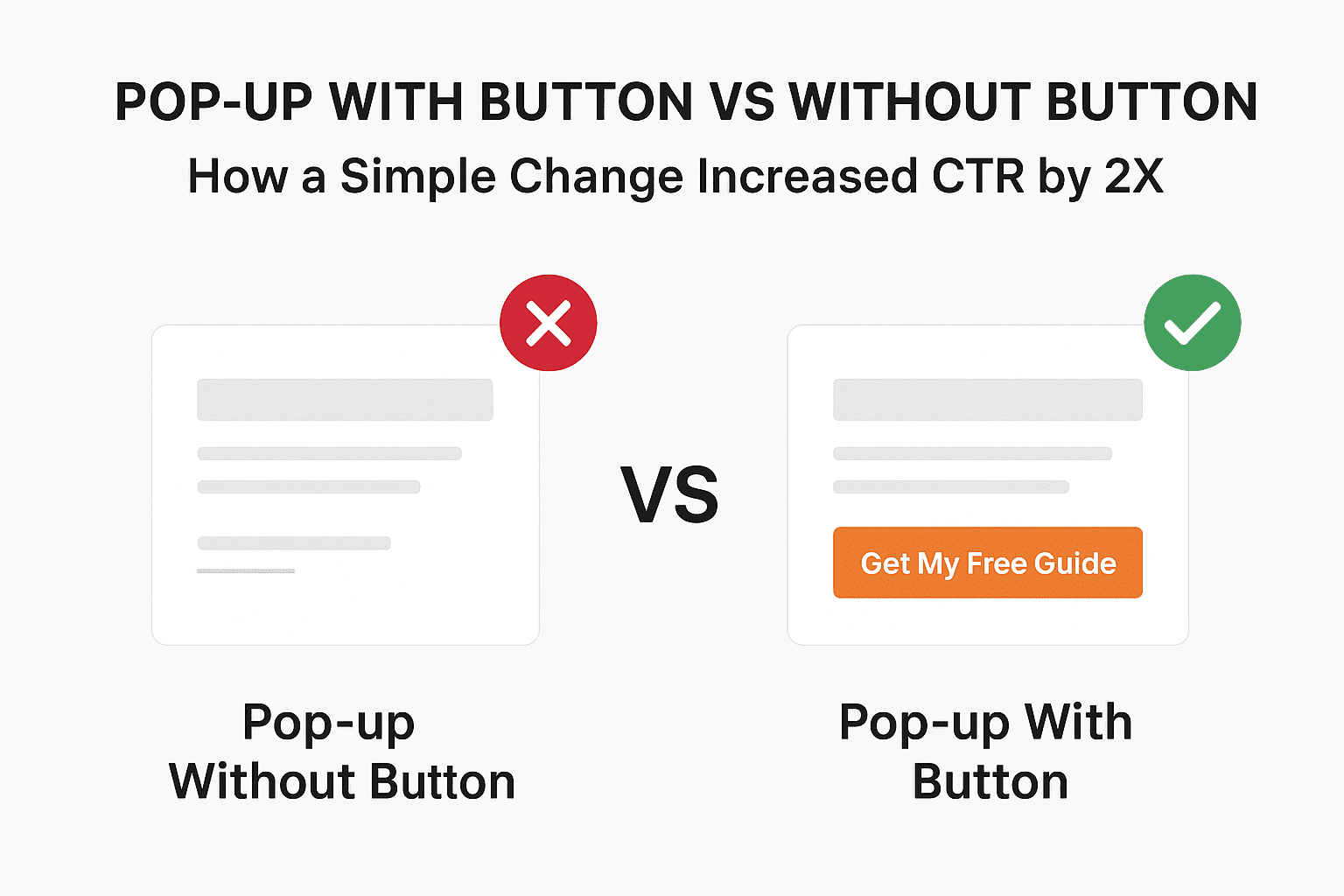
    A marketing team tested two versions of a pop-up:

    • Version A: Displayed text with a hyperlink.
    • Version B: Displayed the same text but included a bright, labeled button (“Get My Free Guide”).
    Before and After Data Comparison
    VersionCTREngagement RateBounce Rate
    Without Button3.2%24%72%
    With Button6.5%48%43%

    The simple inclusion of a button more than doubled CTR and drastically improved user engagement.


    Design & Copywriting Secrets That Make Buttons Work

    Button Color Psychology and Placement

    Colors evoke emotion. Red suggests urgency, blue signals trust, and green encourages affirmation. Placing the button near the eye’s natural scanning zone (center or bottom right) increases visibility and clicks.

    Crafting High-Converting Button Copy

    The best button text uses action verbs and benefit-driven phrasing, such as:

    • “Get My Discount”
    • “Download the Free Guide”
    • “Join Now — It’s Free”

    Testing Pop-Up Variants: A/B Testing Insights

    Setting Up a Split Test Correctly

    Always test one variable at a time — color, copy, or layout — to isolate the cause of improvement.

    Key Metrics to Track for Accurate Results

    Track not just CTR, but also time on page, conversion rate, and scroll depth to assess true engagement.


    How to Implement Pop-Ups with Buttons for Maximum CTR

    Recommended Tools and Platforms

    Top tools like OptinMonster, ConvertBox, and Sleeknote make adding custom buttons effortless.

    Mobile Optimization Tips

    Ensure the button is large enough for thumb interaction and avoid blocking essential content.


    Common Mistakes to Avoid in Pop-Up Design

    Overloading Users with Too Many Pop-Ups

    Bombarding visitors with multiple pop-ups reduces trust and triggers fatigue.

    Ignoring Timing and Trigger Settings

    Timing matters — display pop-ups after 5–10 seconds or on exit intent to reduce annoyance and increase conversions.


    Real-World Examples of High-Converting Pop-Ups

    E-Commerce Use Case

    A fashion retailer used a button pop-up offering “10% Off First Order” — conversions jumped 65%.

    SaaS and Lead Generation Use Case

    A B2B company replaced text-only forms with a single button pop-up. Lead submissions increased by 120%.


    FAQs: Pop-up With Button vs Without Button

    1. Why do buttons increase CTR?
      Because they create a clear visual cue and encourage direct user action.
    2. What color button performs best?
      It depends on your brand, but high-contrast colors like green, orange, or blue often perform best.
    3. Can I over-optimize my pop-ups?
      Yes — too many pop-ups can harm UX and hurt overall site engagement.
    4. Should I A/B test button copy too?
      Absolutely. Even minor wording tweaks can significantly affect conversions.
    5. Do mobile pop-ups perform differently?
      Yes. Mobile users respond better to shorter text and centrally placed buttons.
    6. How soon should I show a pop-up to new visitors?
      Wait 5–10 seconds or use scroll triggers to avoid interrupting user flow.

    Conclusion: Why That Simple Button Doubled CTR

    The difference between a button and no button might seem trivial — but in user psychology, it’s monumental. Adding a clear call-to-action transforms your pop-up from an interruption into an invitation.
    When you guide users to act, they follow. That’s how a single design choice can double your CTR and boost conversions overnight.


    🔗 External Resource: Learn more about conversion psychology and button design from Nielsen Norman Group.